Friday, December 14, 2007

How To Personalize your Scrapbooks Title Page

We all enjoy making scrapbook layouts and albums for ourselves, but often we like to make them for others. We work hard to make the scrapbook pages and layouts tell the story of the person, to capture the memory for that person. Sometimes easy, sometimes hard, but why not just start at the beginning.... WHO is that person?

Capture the personality of the person on the very first "title page".
If you have that very first layout about what makes that person "tick", "who" they are, the memories are sure to flow for you as the creator of the album and for the person as they enjoy perusing their lifetime and reveling in the memories of "their time" and often capturing memories they have forgotten. Sometimes you can even make a new memory of an old time for them. Something you remember about them, or things you did together, or the way you saw that person and what they meant to you. Alot to include, but pretty easy to do!

Sing us a song, you're the piano man.....remember that song?
I associate that song with my brother. He was/is the piano man. He took clarinet lessons in the 5th and 6th grades at school. He then stopped and never had another music lesson in his life. Mom gave us all piano lessons once, and the teacher turned him away saying he knew more than she did! My brother can play any instrument there is - all self taught and proficiently. But the guitar was his favorite. Had he had the opportunity, he could have been right up there with some of the great guitar players. He was that good. He couldn't dance a step, but the music was in his soul.

Since he is music, I used that as his title page to his scrapbook. I used die cuts of music notes, and cut strips of black cardstock to create the music staff lines. This is a 12x12 layout. I chose photos of my brother at different stages in life, mainly just pulling the best facial shots so that you could see him the best, since these little cirlces are a bit small. But I made sure I started with a photo near birth, and ended with a current day photo.

I used a circle cutter and cut the face of each photo just slightly smaller than the music note ball so there would be a black border around the face picture, then adhered the photo to the die cut. Quick, easy and so simple, but boy the memories it captures!!

As the "title" of the album, of course, music related. Instead of just writting his name and birth date (which I did on the next page) I titled his scrapbook album "Written and composed by...." A typical, musically known phrase. And so appropriate, it just completed the layout to perfection.

And there you have it. My brother, his music and his life. The exact reason for a scrapbook. The perfect collection and tribute to his life ... and all on one page! How cool is that!!

Tools used: Although one of the most powerful scrapbook layouts of memories, this is one of the easiest and quickest layouts to create. I used a paper trimmer to cut the strips for the staff lines. I used a circle cutter to cut the photos into circles. Both of these you could do without tools, just free hand! A glue stick, a scrapbook marker pen and a letter stencil - again, you could do free hand.

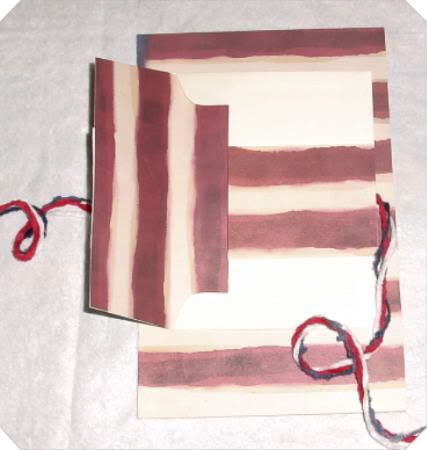
Make Your Own Envelope


1. Find any envelope you want to use for the size. Small, long, square, whatever. Even little package name tags size are fun to work with and have on the page

2. Turn it over to the back. Look to see "how" it is constructed. Usually there is one large flap "glued" over the top of 2 side flaps

3. Starting at the top, gently start "tearing" or peeling the large front flap away from the smaller flaps on the sides. Tear slowly and gently but if it isn't perfectly torn or there are gaps, it won't matter - that is fixable. Just try as slowly and gently as possible to pull the flaps apart to make it easier on yourself!

4. Once apart open it up and now you have your pattern!

5. Open the envelope pattern you just created. flatten it out. Place it on the paper you want to make into an envelope. Sometimes a tiny bit of glue stick in the middle is a good thing to do so that it stays in place. Just make sure you put the glue where the glue residue WON'T show once the envelope is done. Trace around the pattern. Remove the pattern from the paper.

6. Now to make the fold lines: Using the "real" envelope for a guide, take your ruler and line up from side to side, where the folds should be. You will only have 4 fold lines, 2 vertically and 2 horizonaly. Draw a line for each fold. At this point you just make the fold on each line you have drawn.

7. Fold the 2 side flaps in and then fold the lower portion UP, then fold you top flap DOWN. Use your ruler or bone folder to flatten the creases. Now your envelope is created! Apply adhesive ( I use glue sticks) on the side flaps. Fold the bottom flap up and press for the glue to stick. The top flap just folds down.

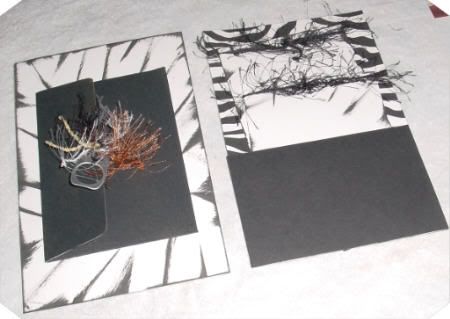
To add extra embellishment: I always cover the inside of the envelope that is visable, like this
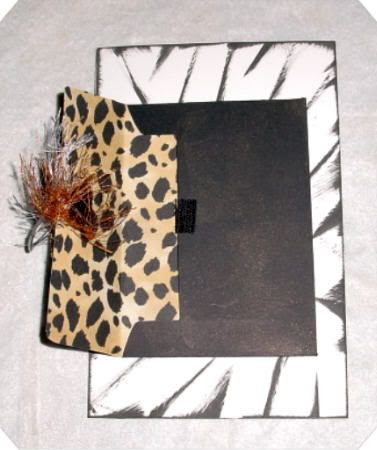


Take the envy you just made and lay it on a contrasting piece of paper. Place it open side up so you can see where to end it. Make the contrasting paper go just below the bottom flap's edge, just to make sure there is no gap showing and when you open the envy all you see is the contrasting paper.

Trace the outline of the envy - basically just the top half of the envy is what you will be tracing. Cut this piece out, and do a bit of wigglying and a small trim of the edges that go inside the envy so that it matches the closing flap. Hard to explain, but as you do this, you will see what I am talking about. Then just glue it down!

Make sure you have glue where the fold line are, and make sure you flatten this very well - use your ruler or a bone folder to smooth it out. This makes sure that there is no "bubble" of the paper in that area.

And you are done!!


Thursday, December 06, 2007

Like To Chat? My Lot is the place for yoU!

Do you enjoy chatting? Well, now a days it is called Social Networking and it is stil so much fun to chat with others about literally anything you can think of or like to talk about! Come join My Lot and be a part of the gang!

http://www.mylot.com/?ref=coffeebreak

Nice chatting with you!


myLot User Profile